Apple wins a major milestone in its legal tussle over the blood oxygen monitoring capability for Apple Watch users. In a development that’s being hailed as a significant triumph, Apple has announced the reinstatement of a redesigned version of the Blood Oxygen feature for certain models sold in the United States.
This move comes after a prolonged patent dispute that had sidelined the feature, offering relief to owners who purchased affected devices without this health-tracking tool.
The core of the story revolves around Apple’s battle with medical technology company Masimo Corp., which accused Apple of patent infringement related to pulse oximetry technology used in the Blood Oxygen app.
The conflict escalated when a U.S. Customs injunction at the end of 2023 forced Apple to disable the feature on new Apple Watch Series 9, Series 10, and Ultra 2 models sold in the U.S., leaving many users without access to blood oxygen readings that could help monitor respiratory health, sleep apnea indicators, or overall wellness.
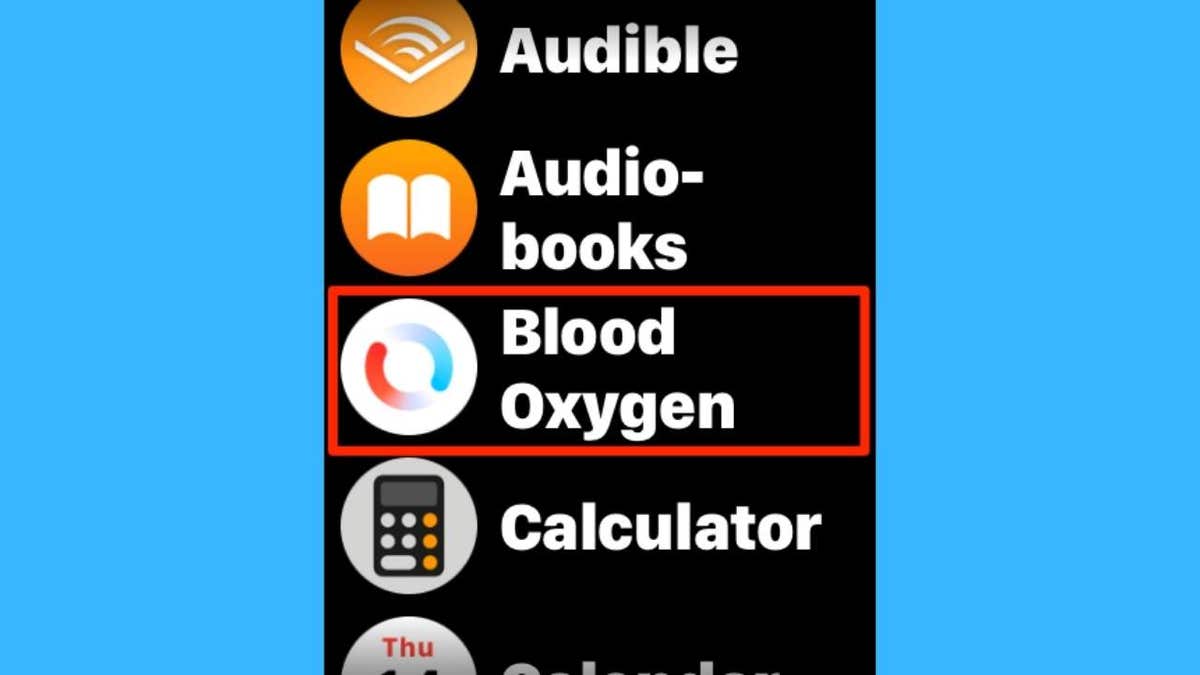
Blood oxygen feature on Apple Watch (Kurt “CyberGuy” Knutsson)
How to get the redesigned blood oxygen feature
Follow these steps to enable the updated Blood Oxygen tool on your Apple Watch:
1) Check your model
- On your Apple Watch, open Settings.
- Click General.
- Tap About.
- Look for the Model Name and confirm it says Apple Watch Series 9, Apple Watch Series 10, or Apple Watch Ultra 2.
- To make sure it’s a U.S. model, check your original purchase receipt or sign in to your Apple ID account and review your device details. U.S. models often have a model number ending in LL/A.
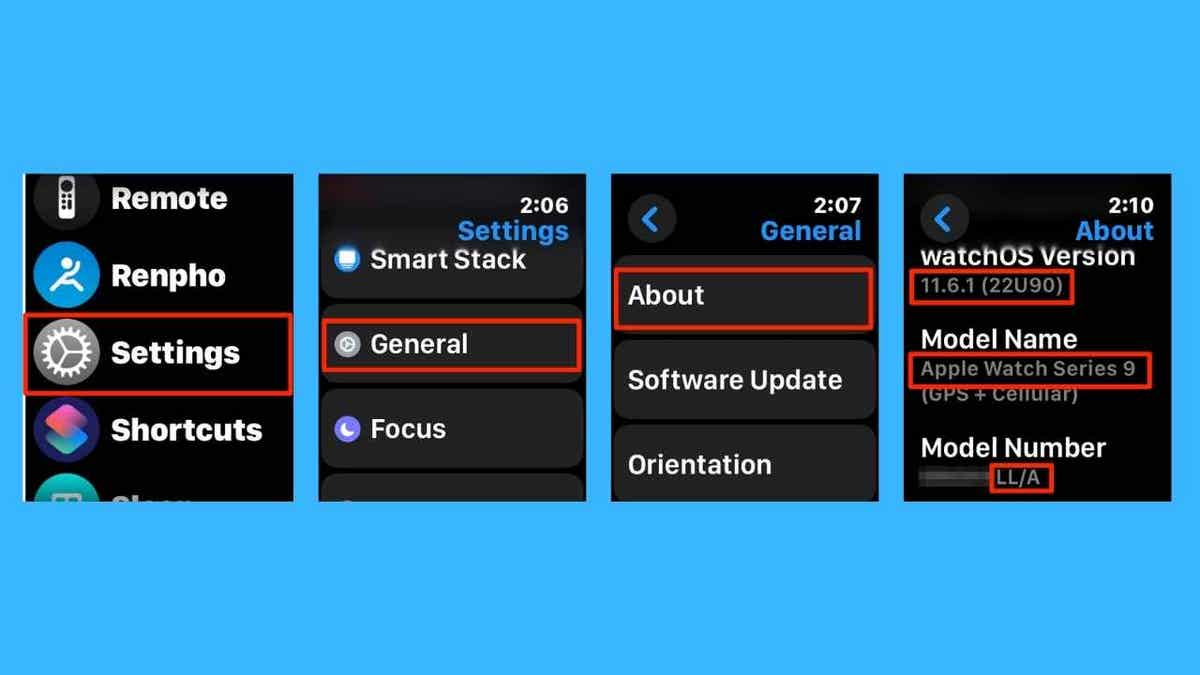
Steps to check your Apple Watch model (Kurt “CyberGuy” Knutsson)
WHAT IS ARTIFICIAL INTELLIGENCE (AI)?
2) Update your iPhone
- On your iPhone, go to Settings.
- Tap General.
- Click Software Update.
- Tap Update Now to install iOS 18.6.1.
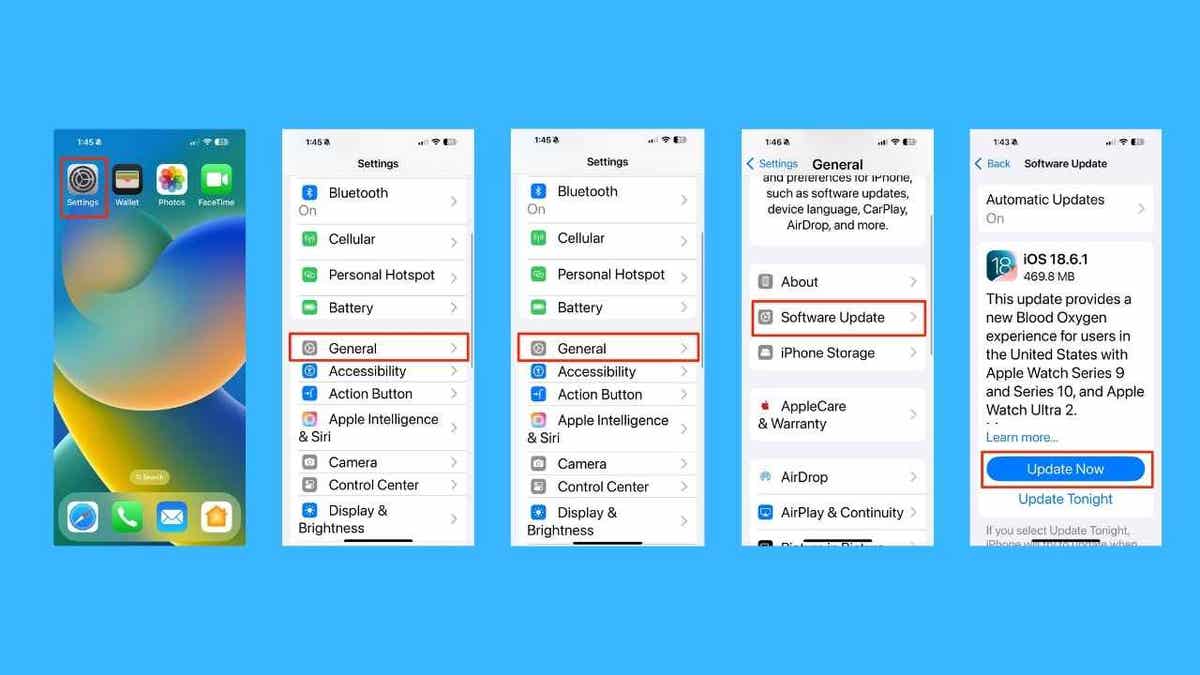
Steps to update your iPhone software (Kurt “CyberGuy” Knutsson)
3) Update your Apple Watch
- Open the Watch app on your iPhone.
- Tap General.
- Click Software Update.
- Install watchOS 11.6.1.
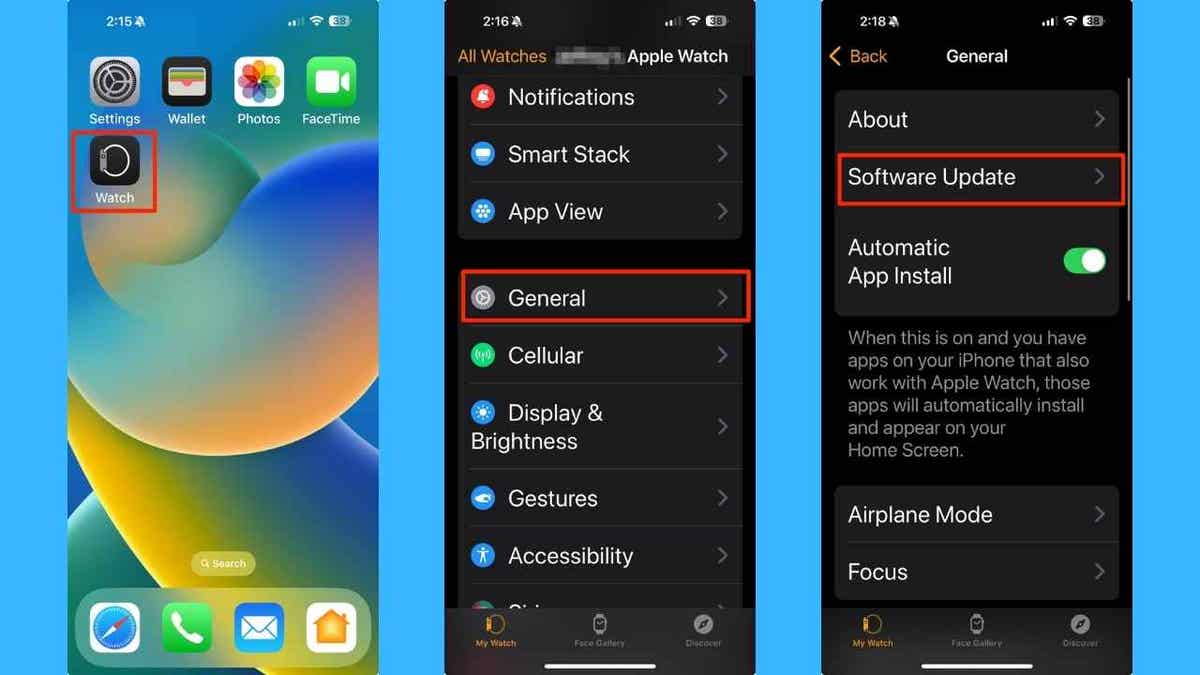
Steps to update your Apple Watch software (Kurt “CyberGuy” Knutsson)
Note: This update will not affect Apple Watches that already include the original Blood Oxygen feature, or watches purchased outside the U.S.
4) Restart both devices
After updating, restart your iPhone and Apple Watch to ensure the changes take effect.
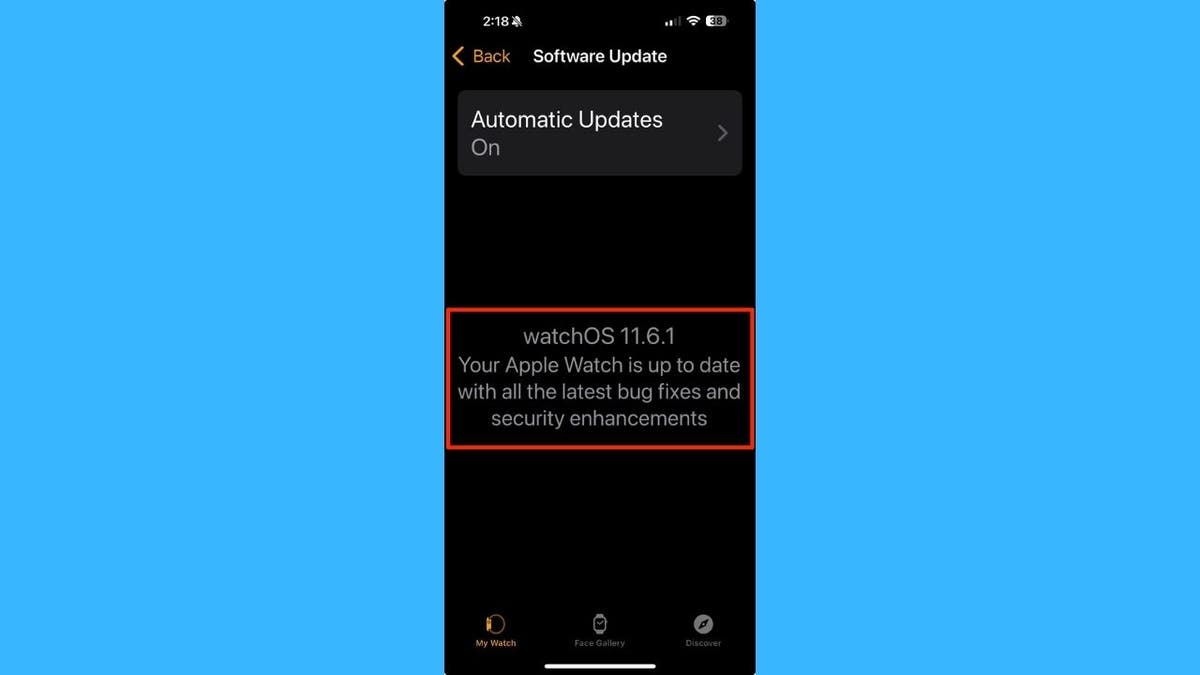
Screenshot of watchOS 11.6.1 update pulse oximetry technology
5) Open the Blood Oxygen app
Use the Blood Oxygen app on your watch to take a reading. Data will be processed on your iPhone and shown in the Respiratory section of the Health app.
- On your Apple Watch, press the Digital Crown to see your apps.
- Tap the Blood Oxygen app.
- Sit still and hold your wrist flat, with the watch facing up.
- Tap Start to begin the reading.
- Wait for the measurement to finish. Your iPhone will process the data and display it in the Respiratory section of the Health app.
- Tap Learn More to view details about your blood oxygen readings and how to interpret them.
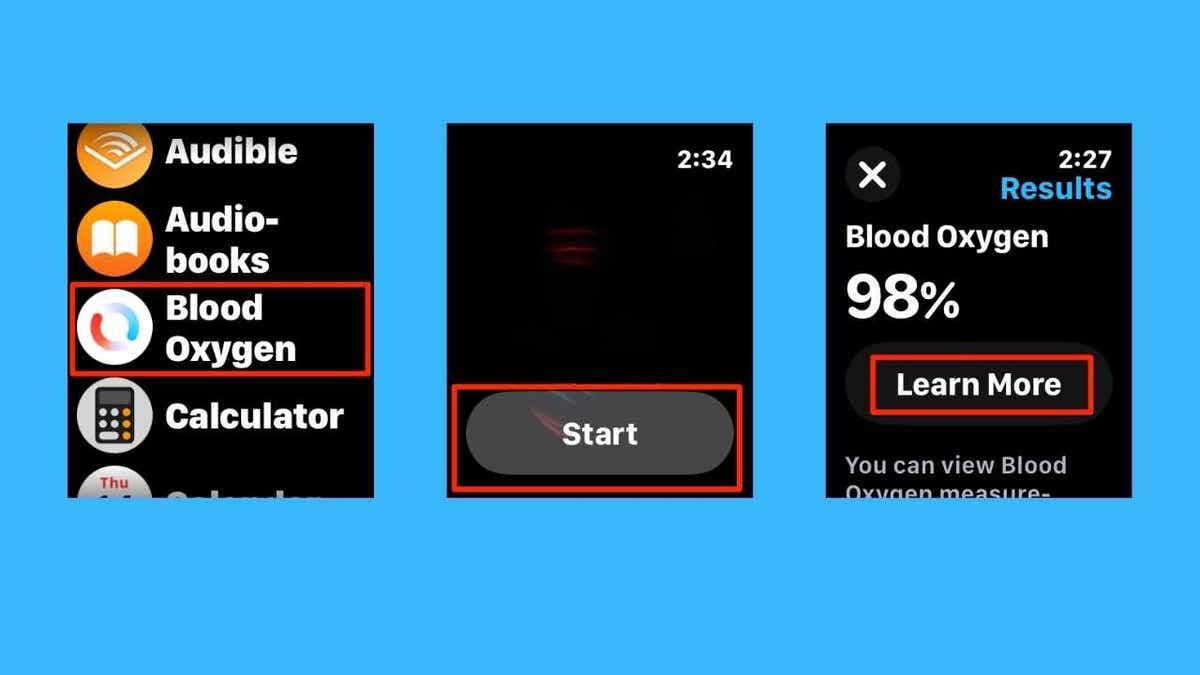
Steps to use the Blood Oxygen app on your watch to take a reading (Kurt “CyberGuy” Knutsson)
6) View your health information in the Health app
Your iPhone saves all blood oxygen measurements in the Health app, whether you take them on demand or in the background.
- Open the Health app on your iPhone.
- Tap the Browse tab on the bottom right.
- Then select Respiratory
- Click Blood Oxygen.
You can also filter your results to see only readings taken while sleeping or in a high-elevation environment. This makes it easier to track specific patterns over time.
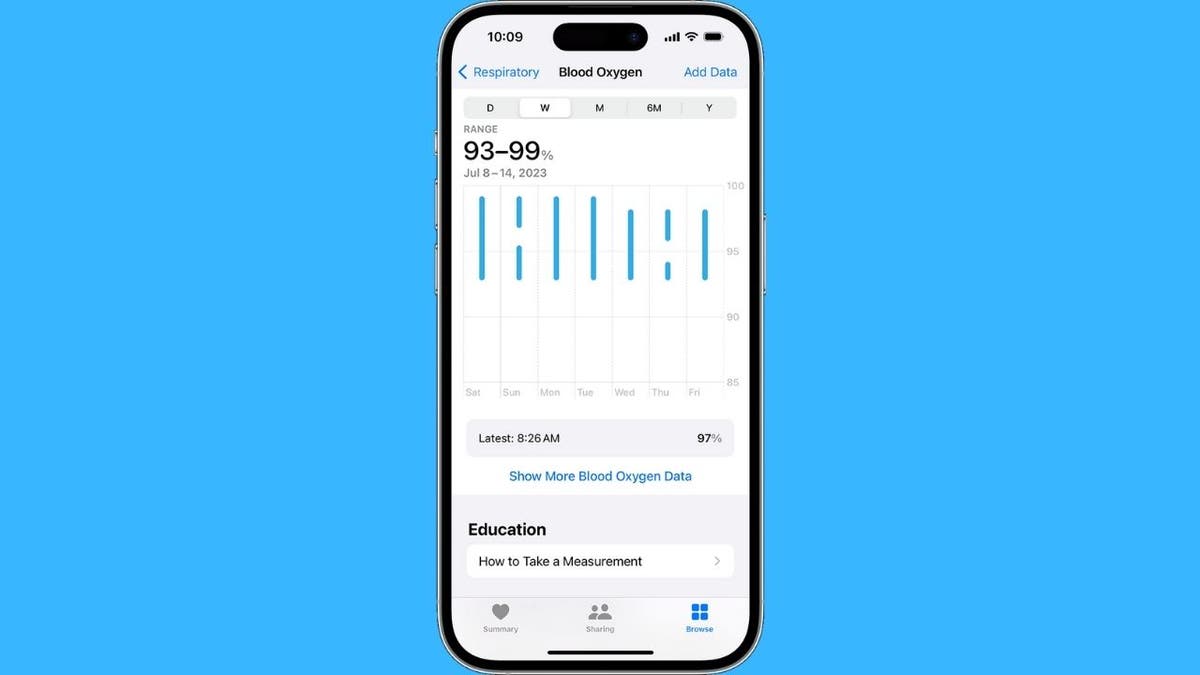
Blood Oxygen data in the Health app on iPhone (Apple)
Apple wins this round thanks to a recent U.S. Customs ruling that paved the way for the feature’s return in a modified form. Rather than processing data directly on the watch, the redesigned system will now measure sensor data on the paired iPhone, with results displayed in the Health app’s Respiratory section.
This workaround maintains the essence of the feature while addressing legal concerns, ensuring users can once again benefit from insights into their blood oxygen levels.
You May Also Like:
Cell phones and screens are keeping your kid awake
Instagram’s new Friend Map feature ignites privacy concerns
From a user perspective, Apple wins big for existing owners of the impacted models who lacked the feature— they can now update their devices to regain this functionality without needing to buy new hardware.
The update involves installing iOS 18.6.1 on the iPhone and watchOS 11.6.1 on the Apple Watch, a straightforward process that Apple emphasizes will not affect devices already equipped with the original Blood Oxygen app or those purchased outside the U.S.
Looking at the broader implications, Apple wins not just for its customers but also in reinforcing its commitment to innovative health features grounded in science and privacy.
The company highlights how the Apple Watch ecosystem includes other tools like irregular rhythm notifications, ECG capabilities, Sleep Apnea Notifications, Fall Detection, sleep tracking, and more, all designed to empower users in managing their health proactively.
However, this isn’t a complete reversal; the redesign shifts some processing to the iPhone, which might introduce minor conveniences or dependencies for users.
Critics and analysts note that while Apple wins this specific skirmish, the ongoing patent saga with Masimo could still evolve, potentially influencing future smartwatch developments or market competition in wearable health tech.
Apple wins admiration from tech enthusiasts for its persistence, as this update underscores the company’s agility in navigating regulatory hurdles while prioritizing user experience. For watch owners, it means enhanced value from their devices, particularly in an era where health monitoring is increasingly vital.
Disclaimer: This article synthesizes unverified reporting from various sources as of August 19, 2025. Information may evolve, and readers are encouraged to verify details independently.
Sources: